The next place you use an AI agent is the chat window that keeps interrupting you.
If your workday runs through Slack or Microsoft Teams, you know the pattern. A message arrives while you’re concentrating. Someone needs an update, a document, a deck. You make a mental note, add another task, or switch projects. Sometimes the request disappears into the conversation.
We’re moving from chatbots that answer questions to agents that carry out assignments. There’s something funny about a chat interface becoming such a useful place to start.

Slack already has the request and the people involved. Add an agent that can do the work, and you can hand off the assignment in the same conversation.
When the next request arrives, tag Claude, give it the context, and return to your current project. Claude can work on the assignment while you keep working on yours.
That is the power of agentic tooling, right where you already work.
This week’s loop
Learn: Turn a familiar chat interface into a place to assign work.
Use: Connect Claude Tag, name your deck-builder repo, and request an updated presentation.
Build: Keep the template, writing rules, graphics instructions, and tools in a reusable microapp.
Give your deck builder a home
Take a presentation deck. We use them for internal updates, client meetings, and decisions that need a room full of people to follow the same story.
You can ask Claude to build a deck. You can ask your company’s AI agent. You can also build a deck-builder microapp that carries your way of doing the job.
A microapp is a small application built around a specific task. For a deck builder, that means bringing together the template, theme, copy instructions, graphics process, and tools that produce the PowerPoint.
Keep those pieces in a repository, or repo, a project folder with a history of its changes. You can adjust the layout, improve the writing rules, and give the builder examples of the graphics you want.
Build the core workflow around ordinary files and scripts, and you can take that work to other agentic tools. The repo gives the process a home you control.
Claude Code can work with that project. Claude Tag brings the same engine into Slack, where it can clone a connected repo, use its saved instructions and skills, and run the work.
Bring the builder into Slack
ChatGPT and Claude both work inside Slack.
The personal ChatGPT app connects to your existing paid ChatGPT account. From Slack’s sidebar, it can draft replies, summarize discussions, and use web search and enabled apps. OpenAI also offers shared workspace agents that can work in channels and return files. On Business, those agents draw from a shared allowance and credit pool.
Claude Tag puts the assignment in the team’s thread. You tag `@Claude`, and it uses the tools and repositories connected to that channel. Channel work draws from your organization’s usage balance; direct messages use your own Claude account.
For the deck-builder microapp, we’ll use Claude Tag. The Claude Tag setup guide covers the initial setup. A few details deserve attention because they caused me to get stuck a few times.
1. Use a GitHub organization repository. Claude Tag connects to GitHub organization accounts. Put the deck builder in your organization’s repo and have the owner grant the channel access to that specific project. Your organization can select the repositories Claude will use.
2. Connect GitHub and assign the access bundle. An owner links the GitHub organization through the Claude GitHub App. In Claude Tag, add the deck-builder repo to an access bundle, the collection of tools and repositories available to Claude, and attach that bundle to the channel or workspace. Include the source connections and installation instructions the builder needs.
3. Fund the work and set spending caps. On a Team plan, fund the organization’s usage balance and set the Claude Tag spending limit. Set a per-channel cap for the channel that will run the builder. Invoiced Enterprise organizations pay through their invoice and can set the same organization and channel controls.
The setup gives the team a shared way to request work from that repo. People can ask for a new deck, review the result, and add comments in the same thread.
Thanks for reading What AI makes PossibNow! Subscribe for free to receive new posts and support my work.
Back to your workday
Imagine you’re deep in a financial model for Acme. You’ve worked through the assumptions and are concentrating on how a change flows through the numbers.
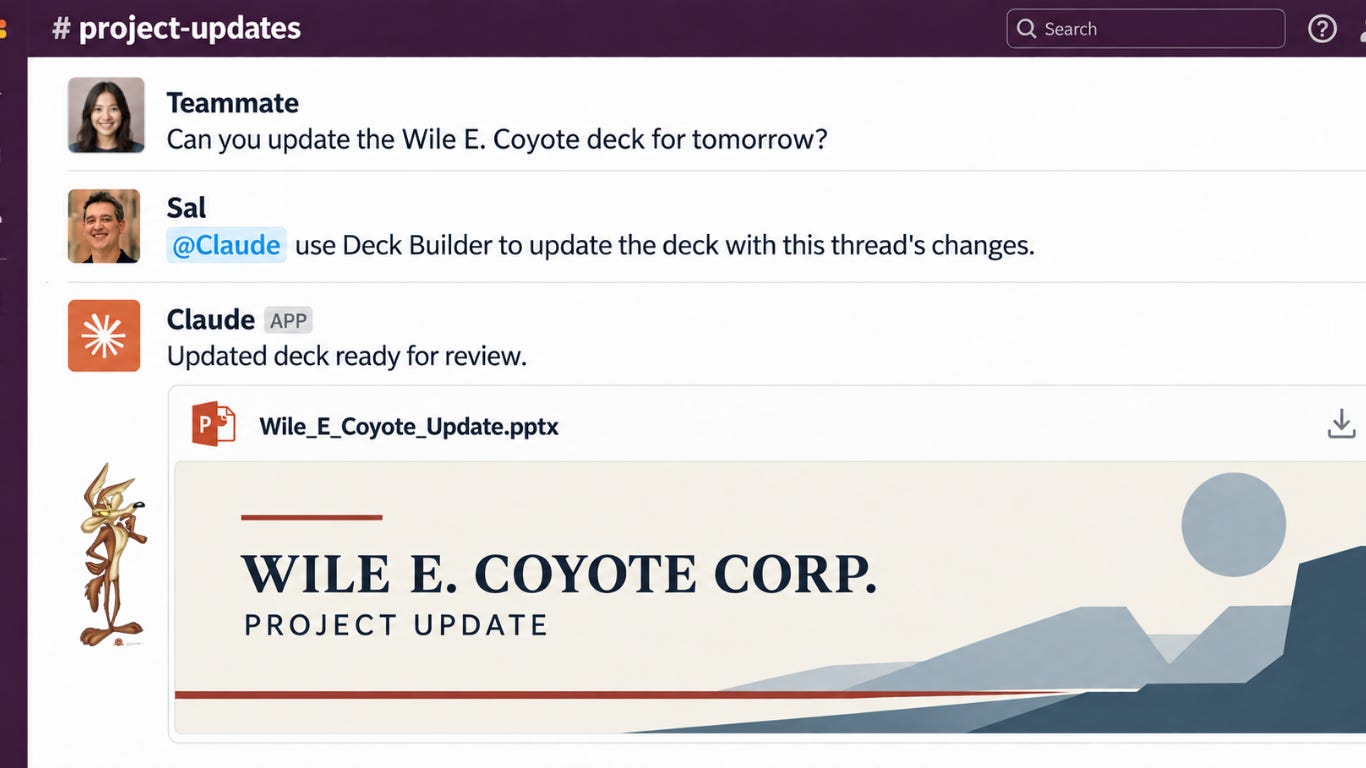
A Slack message arrives. Someone needs the deck updated for tomorrow’s project meeting with Wile E. Coyote Corp.
You know the usual choices. Ignore the message and hope you remember. Read it, add it to your task list, and find your place in the model again. Or drop Acme and start working on the deck.
This time, you reply in the thread.
@Claude, use my Deck Builder repo at [organization/repository] to update the deck for tomorrow’s Wile E. Coyote Corp. project meeting. Use the current deck at [file or connected location] and make the changes requested in this thread. Follow the repo’s template, writing rules, and graphics process. Return the updated PowerPoint here for review.
Add the context Claude needs, press Enter, and turn back to Acme.
Claude works through the deck in its cloud workspace. Your financial model stays open. You keep working through the numbers.
Later, the updated deck arrives in the Slack thread, ready for review. Your team can open it, comment, and ask Claude for another revision. The request and the output stay together.
Now that is productivity. Now that is actually helpful.

Thanks for reading What AI makes PossibNow! Subscribe for free to receive new posts and support my work.
Get the next one on Friday.
Applied AI for professionals, by Sal Carranza. One workflow a week, free.